|
几个月前买了Wii回来玩,我想坛中很多也是已经买了或准备在圣诞这段时间买回来玩。 那你是否想让你的Wii能玩网上下载的备份的游戏? 开始听说有可以玩备份下载游戏,所以在网上做了一些研究。 突然发现已经有人在研究不用往机器里放蕊片的软破解方式,并且在接下来的2个月时间里不断推陈除新,现在的最新版本不能说最好,但已经比以前最初的版本好很多,加载时快很多了。 现在我已经可以玩好几个从网上下载的游戏了。 你是否也有兴趣? 欢迎回贴探讨!要能加分就更好   Basically, 1. You need to install HBC, download from http://hbc.hackmii.com/ 2. You need to install BackupLauncher, download from http://gbatemp.net/?act=module&module=blogs&member=WiiGator After that you should be able to play backup games. Have fun!! Here is the forum which you should read before you put a hand on installing HBC and BackupLoader. Read the 'sticky' thread then you should be able to get an idea and be confident to process. http://gbatemp.net/index.php?showforum=108 http://gbatemp.net/index.php?showtopic=83479 <How-To>Get Homebrew up and running using the Twilight Hack., How To For the people who don't understand it.... What You Need Wii (chip or non-chipped, doesn't matter), SD Card (Remember the Wii doesn't read SDHC so you are limited to 2GB or less), The Legend Of Zelda: Twilight Princess (Wii version), Free Time, Computer, SD Card Reader, WinRAR or any other .RAR/.ZIP extractor Summary: Back Up & Copy save to SD Card Back Up - First you may want to backup your twilight save if you have one. Go into setting -> Data Management -> Save Data -> Wii then save data and copy the twilight save to your SD Card. Connect the SD Card to your computer by a SD Card reader or a built in reader, inside the "private" folder there is another, just keep click on the folders untill you find the save. Move the BIN file to a safe location. Now download the Twilight Princess hacked save. or if you have wii firmware 3.3 download this version 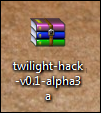 Extract it using your own .ZIP extractor. I use WinRAR so i would right click the .ZIP and choose "Extract to twilight-hack-v0.1-alpha3a". 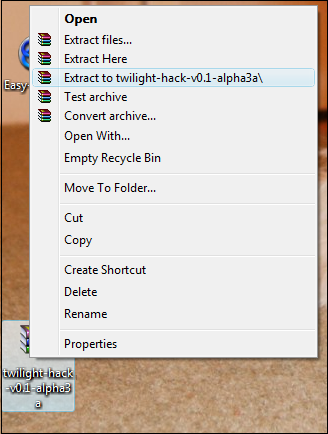 WinRAR will produce a folder called "twilight-hack-v0.1-alpha3a".  Inside that folder there is four BIN files. 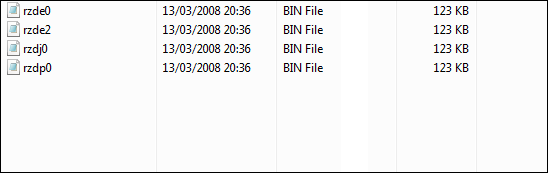 Refer to the Diagram below locate your Region and pick the file name from the diagram. Now select the correct file from twilight-hack-v0.1-alpha3a". So I'm from Europe i would pick rzdp0.bin from "twilight-hack-v0.1-alpha3a". Then copy the save from "twilight-hack-v0.1-alpha3a" into the SD Card where your last save was and name it data.bin. 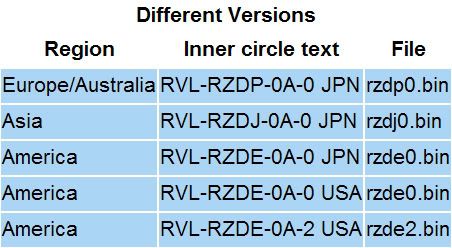 Summary: Copying the save, booting up twilight princess Now take your SD Card and place it inside the Wii's SD Slot. Power on your console and go to settings -> Data Management -> Save Data -> Wii and at the very top there is a Tab called "SD Card" select that and pick the save, select "Copy". After a few seconds it will be done, you can go ahead and Erase this save from your SD Card as you don't need it anymore. Summary: boot your first .elf Now you have everything set up, but to get Homebrew working you must have the Homebrew. Homebrew for the Wii comes in .elf format. Over at Wiibrew.org they have a handy table of wii homebrew which has been released (not all homebrew tho). Pick your homebrew and download it. If it isn't already, rename the .ELF to "boot.elf" and place it on the root of your SD Card (the root is the place where you see when you click on your sd card reader in "My Computer"). 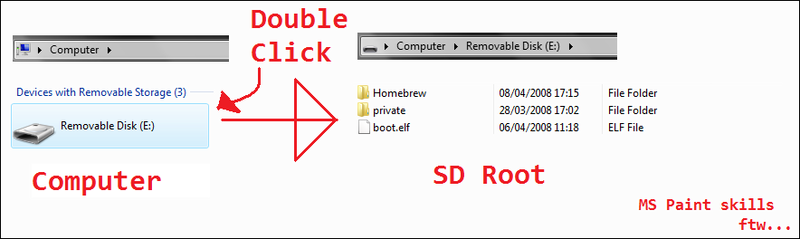 Start up The Legend Of Zelda: Twilight Princess and choose the first save. Walk backwards and a black screen with white writing scrolling will appear. Your choice of homebrew will boot in a matter of seconds. Summary: Extra information The twilight hack can only boot one boot.elf and it doesn't let you choose the homebrew to boot if you have 2 or more .elf's on your SD Card. This is where Loaders come into action. For this Tutorial i will be using the Wii Homebrew Launcher which requires a Gamecube controller. The loader will come in .elf format as normal. Rename it boot.elf and place it on your SD Card, overwriting any other boot.elf if need be. Now for the Wii Homebrew launcher the different homebrew must be in diffeent folders. So make a folder called homebrew and a few new folders in that new folder, name each folder what ever name the homebrew is. 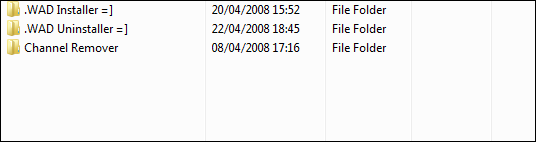 Download the required homebrew you want and rename all the .elf's you download to "boot.elf". Copy each boot.elf to the folders making sure there is a boot.elf in each folder. Now take the SD Card, put it in the wii and load twilight princess, walk backwards and in a few seconds the loader will load. [ 本帖最后由 mytian 于 2008-11-26 11:27 编辑 ] |
